







Probabilistic RFID Data Management |
|||||||||||||||||||||||||
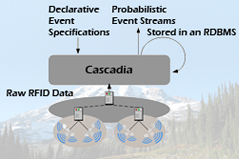 |
Cascadia: Middleware for Specifying, Detecting and Managing RFID Events The Cascadia system is an experimental middleware for supporting the use of passive RFID in real-time location systems (RTLS) and pervasive computing. Key features of Cascadia include: the use of a probabilistic, model-based view to abstract away uncertain RFID data, probabilistic event detection to extract higher-level events from low-level location data, a declarative language for specifying events, an intuitive API for developers and user-level tools for facilitating use by non-expert users. The Cascadia is the middleware for the RFID Ecosystem and includes other software components and tools discussed below (e.g., the Lahar engine, Place Manager, Scenic).
|
||||||||||||||||||||||||
 |
|||||||||||||||||||||||||
 |
Markovian Streams Project The Markovian Streams project is a collaboration between UW CSE's database group and Intel Research Seattle. The goal of the project is to develop algorithms and systems that allow for efficient management and querying of correlated, uncertain, ordered data. These streams are called Markovian streams and are a natural way to represent many kinds of naturally arising temporal data including RFID data, activity data, physiological sensor data, and many others. The key software artifact produced by the Markovian Streams project is the Lahar system, for efficient querying and management of Markovian Streams. We have also developed and tweaked several algorithms (e.g., particle filters, kalman filters) for generating Markovian location streams using RFID data.
|
||||||||||||||||||||||||
|
|||||||||||||||||||||||||
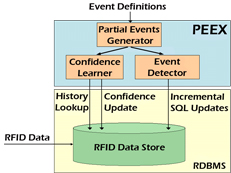 |
The PEEX Probabilistic Event EXtractor The PEEX system is probabilistic event extraction systems that allows applications to easily define, extract and manage meaningful probabilistic high-level events from low-level RFID data. PEEX was the predecessor to the Lahar system and was Cascadia's original event detection engine.
|
||||||||||||||||||||||||
User-Level Tools |
|||||||||||||||||||||||||
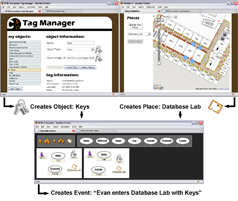 |
Web-Based Tools that allow End-Users to Specify RFID Events Authoring event specifications in the declarative language used by the Cascadia system may be difficult for some developers and impossible for end-users. As such, we developed a suite of web-based, user-level tools designed to empower users by facilitating their understanding, management, and control of personal RFID data. A first tool, the Tag Manager, assists users in creating and managing metadata on a user’s tags and personal objects. The Place Manager supports creation and editing of high-level location information items, called places. A third tool, Scenic, uses the metadata created by the Tag Manager and the Place Manager to enable end-users to quickly and easily create or customize event specifications for Cascadia. We deployed these tools in the RFID Ecosystem and conducted a months of user studies to measure trends in adoption and utilization as well as users’ qualitative reactions.
|
||||||||||||||||||||||||
|
|||||||||||||||||||||||||
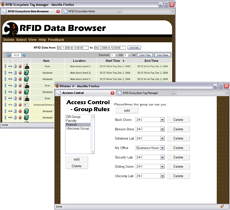 |
Web-Based Tools that allow End-Users to Specify Privacy Preferences The collection and dissemination of personal location and activity data raises a host of privacy issuess. As such, we have developed a suite of tools that assist users in understanding and managing their privacy preferences. One key tool is the Data Browser, which allows users to review and edit all RFID data collected about them. Another tool presents an interface for creating context-aware access control rules (e.g. "My Friends can see my location only between 9a and 5p when I'm in my office.") which extend the Physical Access Control (PAC) policy. We have also deployed and studied these tools in the RFID Ecosystem.
|
||||||||||||||||||||||||
|
|||||||||||||||||||||||||
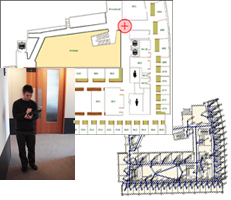 |
RFID Ecosystem Simulator The simulator and its associated toolkit was developed to generate RFID tag read events (TREs) based on previously collected location traces, user-generated traces, or on traces that are randomly generated according to user-provided parameters. The TREs are generated according to a user-specified voronoi graph which includes all antennas and all inhabitable spaces in the simulated deployment. The generated TREs can be stored in a log file, sent to a database, or streamed directly to system components for benchmarking, debugging, and experimentation. The simulator toolkit includes Tablet PC-based applications for generating location trace files. These applications allow users to generate location traces by simply drawing them on top of a map.
|
||||||||||||||||||||||||
Applications |
|||||||||||||||||||||||||
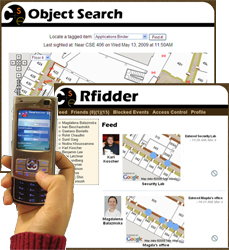 |
RFID-Based Friend and Object Search Some of the simplest location-aware services are those that allow users to query the current location of their friends or personal objects. We've built two applications that offer these services to users. An Object Search application uses forms and a Google maps interface to allow users to search for their lost RFID-tagged objects. The second application, Rfidder (pronounced "arphid-er") is a microblogging app that uses events (e.g. "Kai entered the Ubicomp lab", "Turiya is having lunch with Ying", "The database group meeting in CSE 605 just ended") detected by the RFID Ecosystem to provide a user's social network with an ambient awareness of that user's status. Rfidder has a web-based interface and a mobile interface for Nokia Nseries phones. Rfidder also supports Twitter integration for Twitter users. We have deployed and studied the use of these applications in the RFID Ecosystem with more than 100 users.
|
||||||||||||||||||||||||
|
|||||||||||||||||||||||||
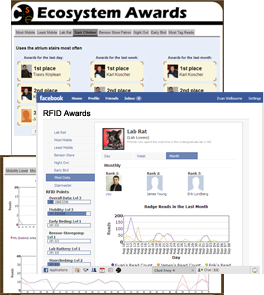 |
RFID Applications Using Historical Data A second category of location-aware services are those which provide query answers over current and historical data. We built a charting application that queries a user's historical data to present charts that show activity or progress over time. For example, we have charts which show a user how often he or she works late (after 9pm) and charts that show how much time he or she has spent in the lab over the past day, week or month. We've also built a competitive Facebook application around historical data, which allows friends to compete in categories like "who gets to work earliest" and "who takes the stairs most often instead of the elevator". We have deployed and studied the use of these applications in the RFID Ecosystem with more than 100 users.
|
||||||||||||||||||||||||
|
|||||||||||||||||||||||||
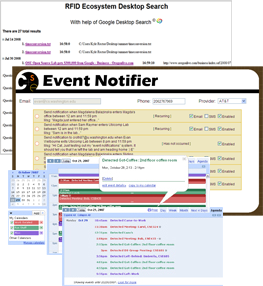 |
RFID Applications Using Complex RFID Events
|
||||||||||||||||||||||||
RFID Security and Privacy |
|||||||||||||||||||||||||
 |
The UW CSE RFID Security and Privacy Group Our group includes participants from the database, security, and ubicomp groups. Key research topics have included: identifying, investigating, and addressing security and privacy concerns that emerge from RFID Ecosystem user studies; developing socially appropriate policies for access control and information dissemination; applying data privacy techniques to RFID data; and designing systems that assist users in better understanding and managing their privacy settings.
|
||||||||||||||||||||||||
|
|||||||||||||||||||||||||
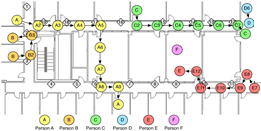 |
Physical Access Control In our work with socially appropriate access control we developed a policy called Physical Access Control (PAC). PAC protects privacy by constraining a user's access to only those events that occurred when and where that user was physically present. Though it strictly limits information disclosure, the database view afforded by PAC is still useful because it augments users’ memory of places, objects, and people. We tested the feasibility of PAC and argue that it is appropriate as a default access control policy because it models the physical boundaries found in everyday life.
|
||||||||||||||||||||||||
|
|||||||||||||||||||||||||
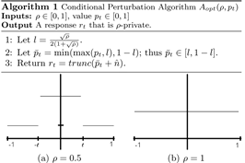 |
Access Control Policies For Uncertain Data RFID data often contains gaps or missing information due to read errors or limited deployments. This introduces a potentially large amount of uncertainty into RFID data stores. As such, in addition to developing rule-based extensions to the PAC policy, we developed extensions that work with uncertain data using recent work in database authorization views as a foundation.
|
||||||||||||||||||||||||
|
|||||||||||||||||||||||||
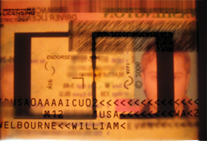 |
RFID Hacking and Security Prof. Yoshi Kohno's security group has investigated the security of popular RFID systems, revealed flaws and proposed practical, novel fixes. Particular focus has been given to the EPC Gen 2 RFID standard used in the RFID Ecosystem and in Washington State Enhanced Driver's Licenses, and other WITI-compliant cards.
|
||||||||||||||||||||||||
Public Service |
|||||||||||||||||||||||||
 |
Analysis, Discussion and Education on Popular RFID Systems A key goal of the RFID Ecosystem project is to inform businesses, policy-makers, researchers and the general public of the benefits and challenges of RFID systems before these systems become common place. Since 2006, we've given numerous presentations on RFID and participated in general meetings, rountables, summits and workshops concerning prominent RFID systems. We've also analyzed public RFID systems being deployed in Washington State and have played an active role in educating the public and state legislature of the benefits and privacy risks involved. |
||||||||||||||||||||||||
| Course Projects |
|||||||||||||||||||||||||
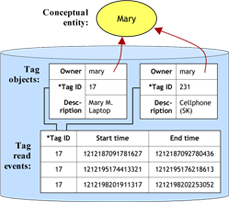 |
TAGSTER: Relational Database Data Clustering Based on Location Data From a Ubiquitous RFID Environment The TAGSTER project aims to tackle to the problem of associating RFID tags with tagged entities, a currently time consuming and potentially error-prone process. In this project, the researchers propose to automatically identify entities associated with some set of tags, and subsequently maintain information about the tag set and the entity as both evolve over time. Numerous data mining and machine learning algorithms were applied using the WEKA toolkit and the results illustrate a range of trade-offs in terms of time required and quality of clusters. Alexei Czeskis and Cynthia Matusek CSE 544 09wi Course Project |
||||||||||||||||||||||||
|
|||||||||||||||||||||||||
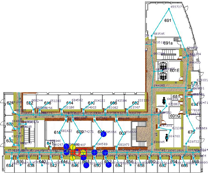 |
Towards Continuous Markovian Stream Processing A key bottleneck in the Cascadia system has been the particle filter that is used to materialize the probabilistic model-based view of an RFID tag's location. This project seeks to eliminate that bottleneck by replacing the particle filter with a Kalman filter. After much tuning and optimization, the researchers were able to show that for small sample data sets, a Kalman filter with variable lag smoothing can achieve the same accuracy as Cascadia's particle filter while runing several orders of magnitude faster. Andrey Kolobov and Jessica Change CSE 544 09wi Course Project |
||||||||||||||||||||||||
|
|||||||||||||||||||||||||
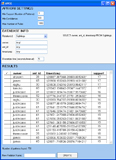 |
APEX: Automatically Extracting Events from Sensory Data The APEX system takes a human-in-the-loop machine learning approach to help users extract high-level events from low-level RFID data stored in relational databases. APEX automatically searches databases for high-level events in the form of statistical patterns which it presents to the user for iterative refinement and then stores for future sensor-based application use. APEX is intended to make interaction with databases more accessible to end users such as sensor-based application developers. Saleema Amershi CSE 544 08au Course Project |
||||||||||||||||||||||||
|
|||||||||||||||||||||||||
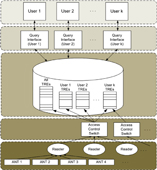 |
Assessing Fine-Grained Access Control Techniques for Peer-to-Peer Privacy Concerns This project identified malicious attackers, curious peers, and institutional surveillance as key privacy concerns for a network-based RFID system. In addition, this work included the design, implementation, and evaluation of a novel, default access control policy to address the problem of curious peers: Physical Access Control (PAC). The central concept is to allow users access to data on only those events that occurred when and where they were physically present. An efficient implementation is achieved using materialized authorization views. Travis Kriplean and Evan Welbourne CSE 544 07au Course Project |
||||||||||||||||||||||||
|
|||||||||||||||||||||||||
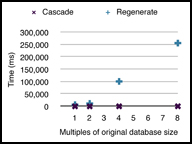 |
Privacy and Opting-Out in a Location-Sensing RFID Ecosystem |
||||||||||||||||||||||||
|
|||||||||||||||||||||||||
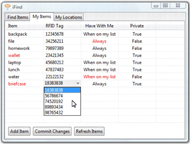 |
iFind iFind is a system that uses RFID tags to track important items throughout a building and allows users to utilize this information when trying to locate a misplaced item or confirm they have all essential items that they need when leaving a specified area. This information can also be used by administrative personnel in tracking assets or monitoring restricted items. Users receive information via a mobile or desktop interface. An overall evaluation of iFind has shown that the system is accurate for locating items and generating alert notifications. Christine Lovett, Mallory Scola, and Adam Warbington CSE 477 Capstone Project |
||||||||||||||||||||||||
|
|||||||||||||||||||||||||
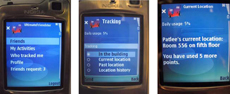 |
Ultimate Friendstar Ultimate Friendstar is a privacy-enhanced friend-finder application for the RFID Ecosystem. Each user carries a mobile phone and an RFID tag and may make queries on the location of friends. To increase privacy, UF provides protections that allow users to specify who can view what information and when. These protections include: 1. Queries can only be made if both the inquirer and target are inside the CSE building. 2. Each user has a username, password, and a list of authorized friends. 3. Users can set friend-specific privacy settings for each friend in a friend list. 4. Privacy settings control the times at which location can be accessed as well as the precision (e.g. Alice can see which room I am in right now , but Bob can only see whether or not I'm in the building today). 5. There is also a limit on how many queries a particular user can make in a day. Patricia Lee, Anna Ma, Binh Tran CSE 477 Capstone Project |
||||||||||||||||||||||||
